Hello there! 🖖
Recap
- Tool: llama.cpp
- OS: Windows
1. [Hugging Face Models](https://huggingface.co/models)
2. App: llama.cpp
3. Model: SmolVLM-500M-Instruct-GGUF
4. Win + R -> winget install llama.cpp
5. CMD -> llama-cli -hf ggml-org/SmolVLM-500M-Instruct-GGUF:Q8_0

/// Cleanup
1. winget list llama.cpp
2. winget uninstall --id ggml.llamacpp
Step-by-Step Implementation
Quick Way to Run llama.cpp on Windows
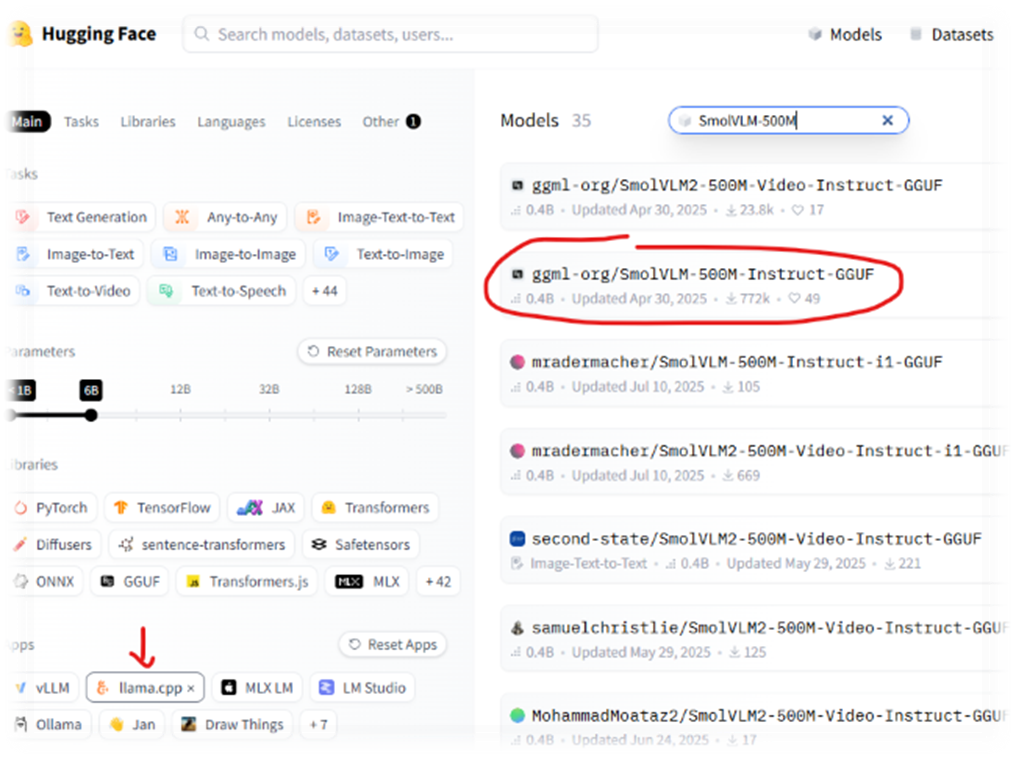
- Navigate to Hugging Face Models
- App: llama.cpp
- Model: SmolVLM-500M-Instruct-GGUF
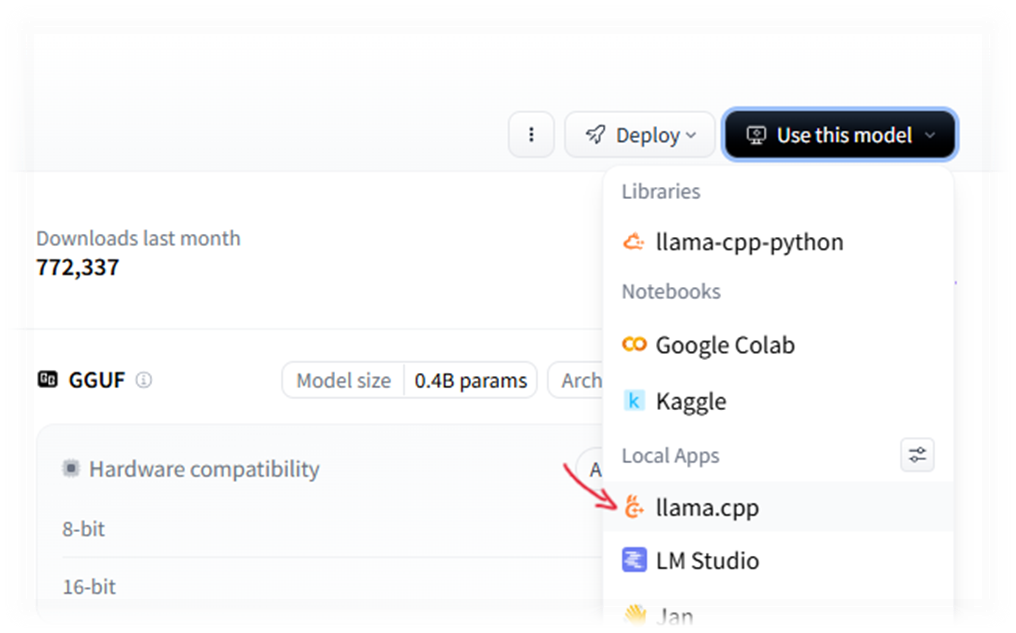
- Click “Use this model” -> “llama.cpp”
- A modal window will appear with instructions on how to install llama.cpp and a command to run the selected model.
- Use WinGet to install and run:
# Press Win + R and type powershell (or use Terminal/CMD)

# 1. Install llama.cpp via Windows Package Manager
winget install llama.cpp

# 2. Download and run the model directly from Hugging Face in the console
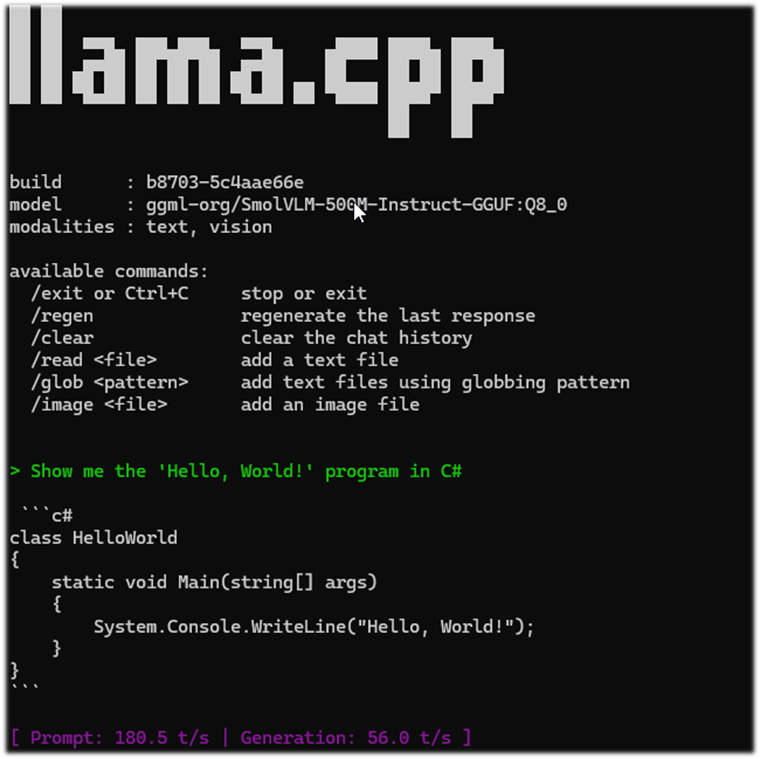
llama-cli -hf ggml-org/SmolVLM-500M-Instruct-GGUF:Q8_0
llama.cpp Cleanup
- First, check the exact name of the installed package:
winget list llama.cpp
- Then uninstall it by ID
winget uninstall --id ggml.llamacpp
*! Important: The folder with the downloaded model will not be deleted automatically; you’ll need to remove it manually. It is usually located at
%USERPROFILE%\.cache\huggingface\hub
Blabber
Why do we need our own local LLM !?
On the one hand, 99.99% of tasks are already covered by existing services. I won’t even try to list them: new tools appear every day, and it’s impossible to keep up with this stream.
//todo Figure out how to keep up with the stream of popular services and frameworks updates 😅
But besides the purely practical use, there is also academic interest — the desire not only to study the theory but to get some hands-on experience. I’m planning a series of connected articles where we will build a complete infrastructure, from model deployment to practical application.
Currently, there are several popular tools for local use:
| Tool | Interface | Key Feature | Engine |
|---|---|---|---|
| Ollama | Terminal (CLI) | Maximum simplicity; launch models with a single command. | llama.cpp |
| LM Studio | Graphical Interface (GUI) | Convenient model search on Hugging Face and intuitive settings. | llama.cpp |
| Jan.ai | Graphical Interface (GUI) | Total privacy and an interface that closely resembles ChatGPT. | llama.cpp |
| GPT4All | Graphical Interface (GUI) | Optimized for standard CPUs and capable of working with local documents. | llama.cpp |
| Text-Gen WebUI | Browser Interface (WebUI) | Support for all kinds of extensions and deep parameter customization. | llama.cpp, ExLlamaV2, AutoGPTQ, Transformers |
| LocalAI | API / Docker | OpenAI API replacement for developers (code compatibility). | llama.cpp, Whisper, Diffusers, TTS |
An interesting point: most of these are either built on top of llama.cpp or interact closely with it.
llama.cpp is an open-source project by Georgi Gerganov (ggerganov). Unlike most AI tools that require powerful NVIDIA GPUs, llama.cpp works well even on regular CPUs. But… there is an interesting catch. We will deal with it in the following articles, but for now, let’s try to deploy llama.cpp on Windows and see what happens.
Thank you for reading my “blabber” 🙏 Keep calm and code on! 🚀